SAP on AWS delivery

SAP S/4HANA implementation on AWS for a pharmaceutical business

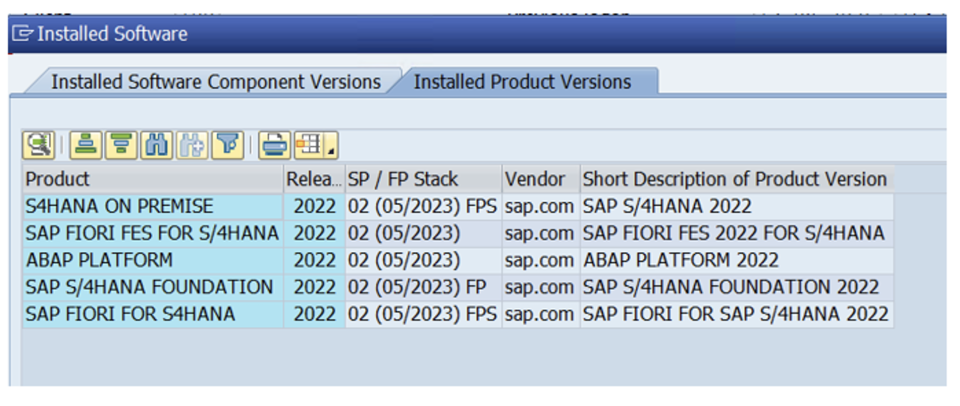
Cloudwrxs supported the implementation and business go-live of SAP S/4HANA 2022 on AWS for a pharmaceutical subsidiary, alongside Solution Manager and Web Dispatcher. The programme included greenfield deployment, SAP Best Practices activation, legacy-data migration from ECC, transport and Basis support, backup and recovery design, and business continuity planning for production.

The implementation process unfolded in a clear delivery sequence

The programme was executed as a greenfield S/4HANA implementation with a strong Basis and infrastructure workstream running alongside the application rollout. The target landscape supported a pharmaceutical business and included SAP S/4HANA 2022, Solution Manager and Web Dispatcher.

The implementation process involved migrating several years’ worth of legacy data from their ECC system into their new S/4HANA system to support their pharmaceutical business operations.
The implementation process unfolded as follows:

  • A Greenfield implementation of the S/4HANA system
  • Activation of SAP Best Practices
  • Customization of the system to meet specific needs
  • Migration of legacy data using the Migration Cockpit
  • Ensuring business continuity throughout the process
  • Successful business go-live

SAP on AWS planning decisions determined the shape of the deployment

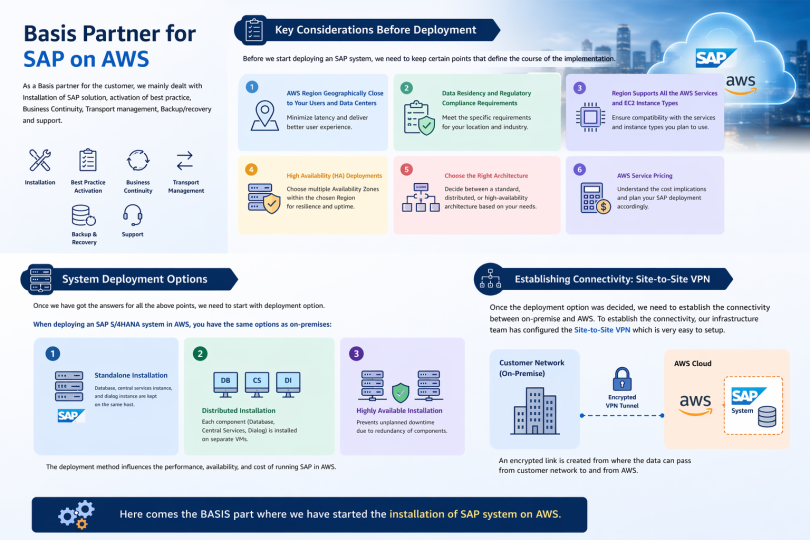
Before any SAP system was deployed, the implementation had to settle a number of foundation decisions: the AWS Region closest to users and data centres, data residency and regulatory requirements, support for the required AWS services and EC2 instance families, multi-AZ needs for HA, the right deployment model, and the commercial impact of AWS service pricing.

Those choices set the course for the full implementation. Once they were clear, the project could move from design decisions into actual deployment and connectivity planning.

Region, service availability and pricing considerations for cloud deployment

What were the options?

When deploying an SAP S/4HANA system in AWS, you have the same options as on-premise

  • A standalone installation, where the database, central services instance, and the dialog instance are kept on the same host.
  • A distributed installation, where each component is installed on separate VMs.
  • A highly available installation, which prevents unplanned downtime due to redundancy of components.

Development was built as a distributed S/4HANA environment

SAP Best Practice provide a preconfigured content library of end-to-end business processes, based on SAP’s extensive global implementation experience. These packages support rapid configuration and deployment, ensuring process consistency and reducing customization efforts across SAP projects.

  • SAP S/4HANA
  • OS – SUSE Linux Enterprise Server 15 SP5

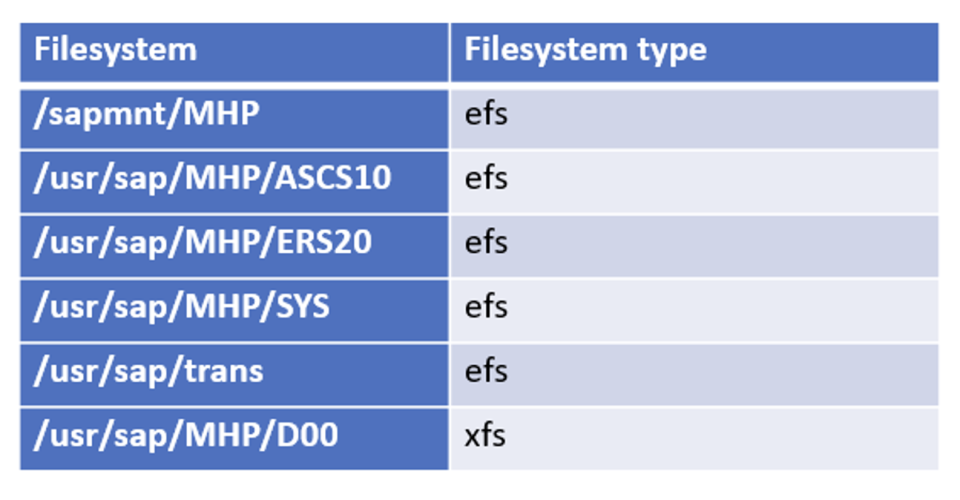
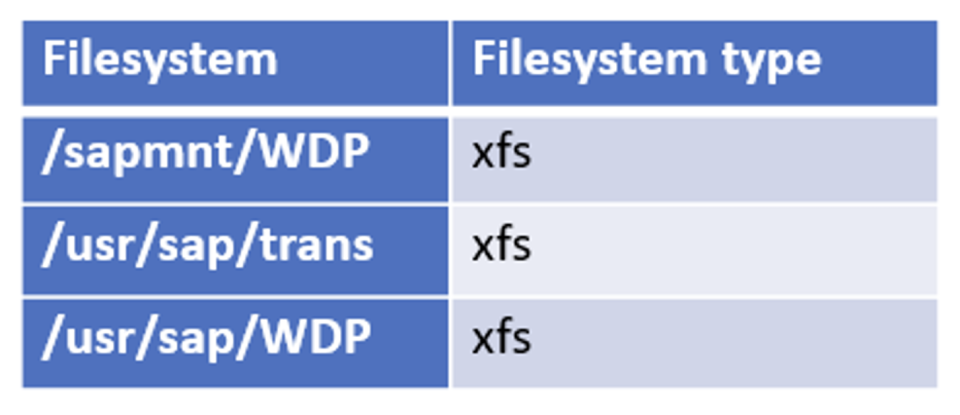
Filesystems

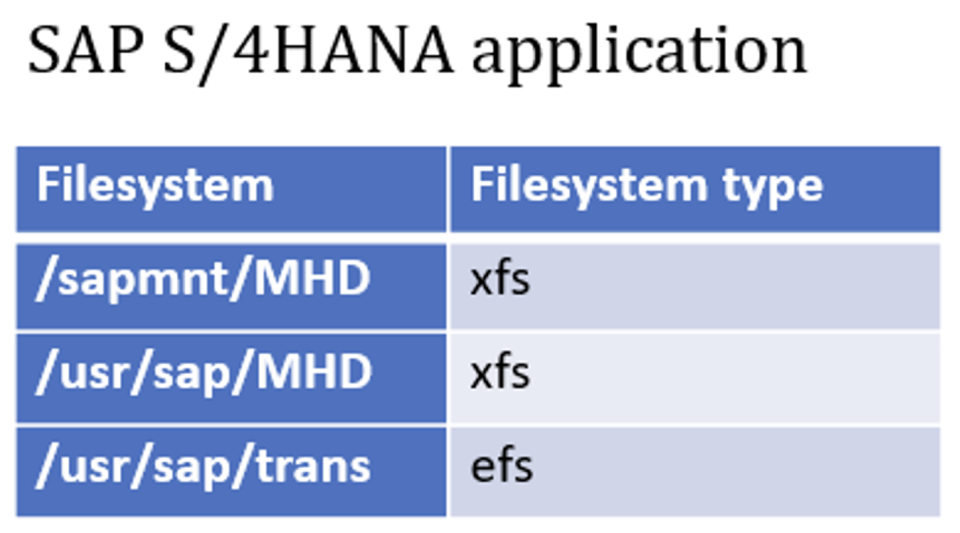
Application server filesystem mount points
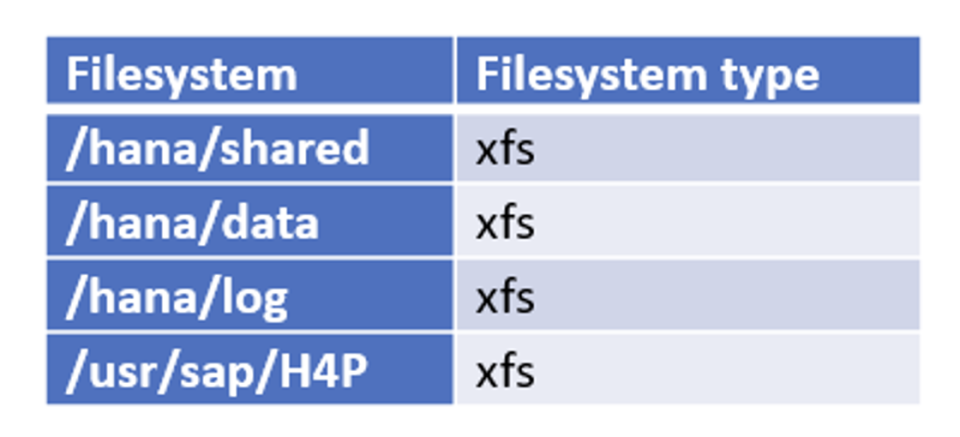
Database server filesystem mount points
Central services filesystem layout
Shared filesystem layout for continuity planning

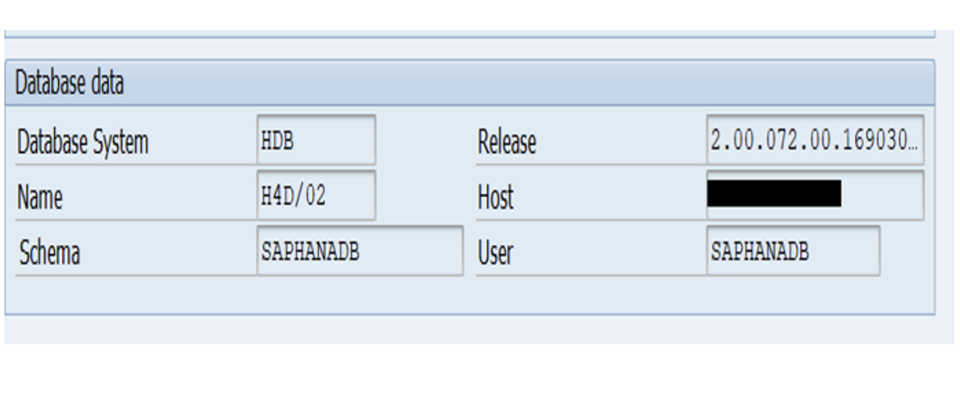
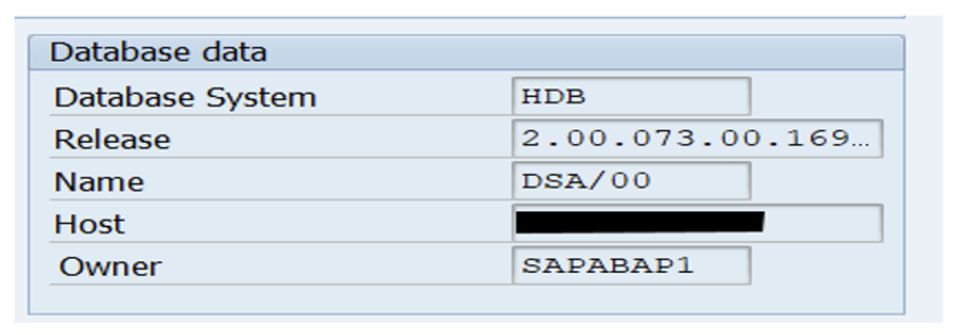
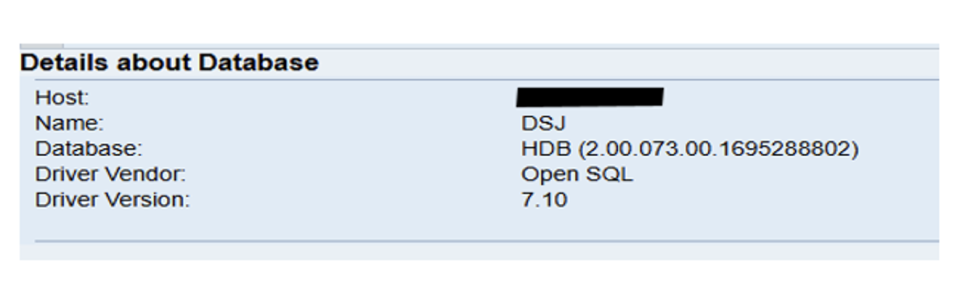
The development landscape ran SAP S/4HANA 2022 with the primary application server, ASCS and central services on SUSE Linux Enterprise Server 15 SP5, while the HANA database ran on a separate dedicated database host. Solution Manager 7.2 was also deployed with its own database host. This was a distributed deployment in which the database and application tiers were intentionally separated.

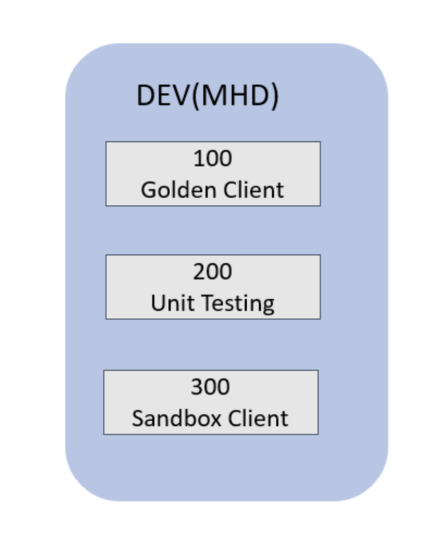
After the installation and post-installation work, multiple clients were created for specific business and functional needs. SAP Best Practices were then activated for Germany, Saudi Arabia and the UAE, with the group currency changed from the default USD to KWD to suit the client’s operating model.

    Client 100 – Customization & Development

This is a unique client. It is the origination client for all functional transports across the landscape. It is the only client in the landscape that cannot be recreated with a client copy. It cannot be refreshed; it can only be restored. This client is used by the ABAP programmers to create new ABAP code.

    Client 200 – Unit testing

This is the first client where official testing occurs. The Unit Test Client is for testing individual transactions and configuration; i.e., the smallest unit of a transaction or business process. Everyone works in the Unit Test Client. All transactions are executed in the Unit Test Client. ABAP code, Security Activity Groups, Data loads, Configuration, Master Data, Batch Jobs are all tested in this client. This client is the earliest version of what Production will look like with data in it.

    Client 300 – Sandbox client

Sandbox client is a separate, isolated environment used for testing and experimenting with configurations and customizations without affecting the main development or production systems.

Development clients 100, 200 and 300 in S/4HANA

Solution Manager and Site-to-Site VPN supported the programme controls

Once the deployment model was chosen, connectivity between the on-premises estate and AWS was established through a Site-to-Site VPN. The development architecture placed SAP S/4HANA, Solution Manager and HANA in a private subnet, with a jump server in a public subnet to provide controlled access into the landscape.

Solution Manager was used for change request management, system monitoring, EWA alerts, and ADS support for the S/4HANA development and quality systems. This kept the project governed while the implementation moved through build and testing.

  • Private-subnet architecture for SAP systems and database hosts
  • Jump server in a public subnet for secure administrative access
  • Site-to-Site VPN between customer network and AWS
  • Solution Manager used for change, monitoring, EWA alerts and ADS

High level Architecture

SAP on AWS high level architecture with VPN, jump server, public subnet and private subnet
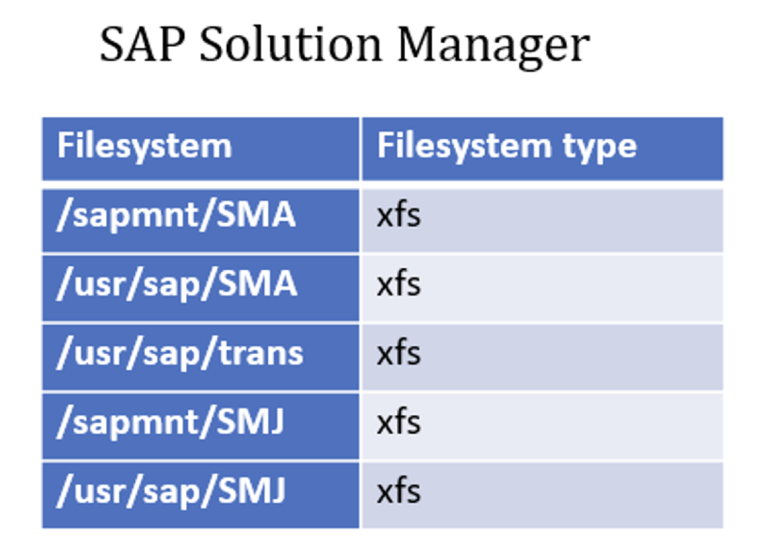
Sol Man Filesystems
Solution Manager filesystem mount points
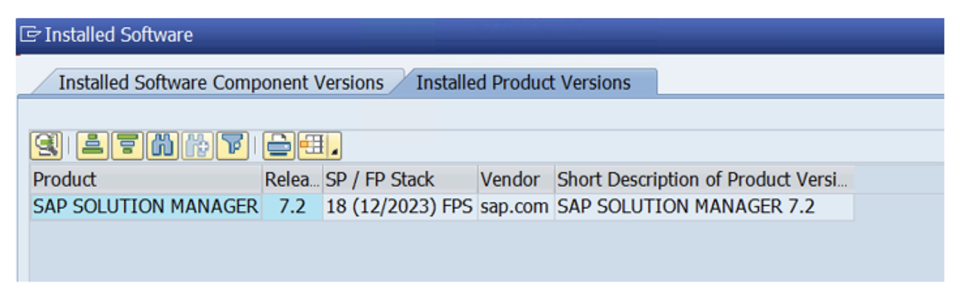
Solutions manager 7.2 ABAP
ABAP filesystem layout for Solution Manager
SAP on AWS private subnet architecture with controlled administrative access
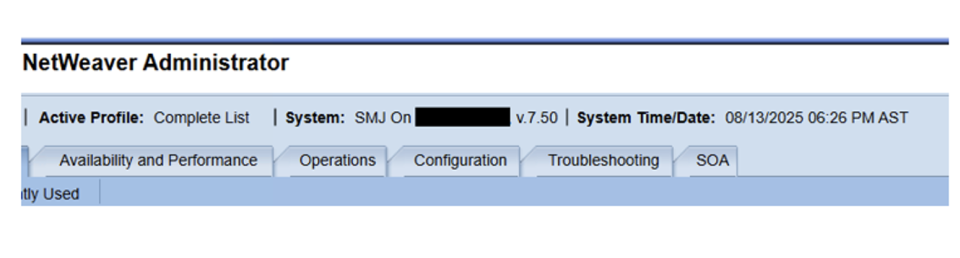
SAP NetWeaver Java 7.5
NetWeaver Java filesystem layout
Architecture diagram showing application, database and connectivity layers

Quality mirrored development but added scale for SIT and UAT

The quality system retained the same overall architecture as development, but a larger database instance was used because SIT and UAT required more data. An additional application server was also provisioned so load could be distributed between PAS and AAS.

This allowed the quality environment to behave much more like a realistic pre-production landscape while still keeping the build pattern familiar to the delivery teams.

  • SAP Change Request Management
  • System Monitoring
  • EWA alerts
  • ADS for S4 Development and Quality system

The architecture of Quality System almost remains the except few points:

  • Higher-capacity database host to support larger data volumes
  • Additional application server added for load distribution
  • SIT and UAT performed on a landscape close to production behaviour

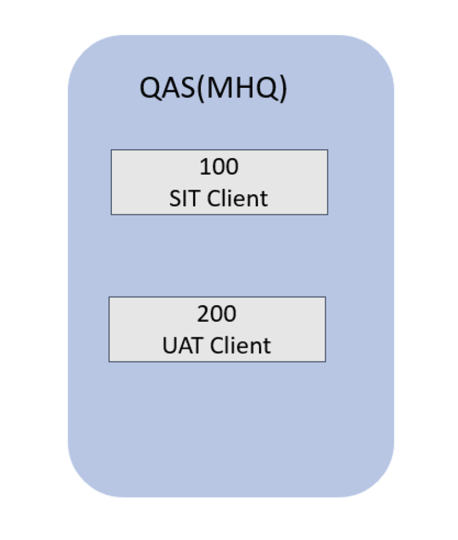
Client 100 – System integration testing (SIT)

This client concerns the overall testing of a complete system of many subsystem components or elements.

Client 200 – User acceptance testing (UAT)

Also called application testing or end-user testing, is a phase of software development in which the software is tested in the real world by its intended audience

Quality clients for SIT and UAT

SAP on AWS production was deployed as a highly available, multi-AZ landscape

Before SAP HANA system replication and high-availability controls were discussed, the project first put database backup in place. AWS Backint was used to back up the HANA database to an S3 bucket, with daily backups scheduled through SAP HANA Cockpit.

Backint provided the interface between SAP HANA and external backup storage, while the AWS Backint Agent handled the transfer of backup and catalog files into Amazon S3 or AWS Backup. This supported full, incremental and differential backups, along with log and catalog protection.

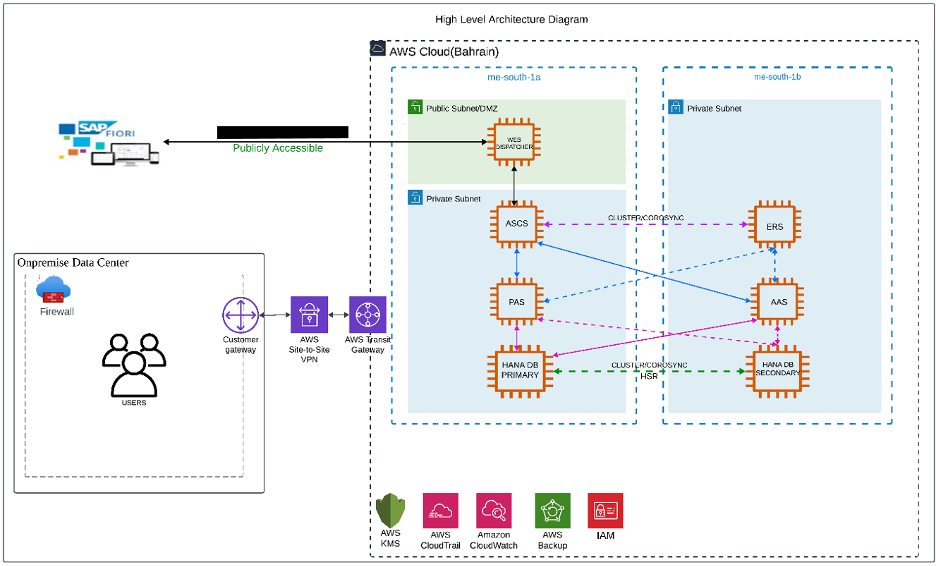
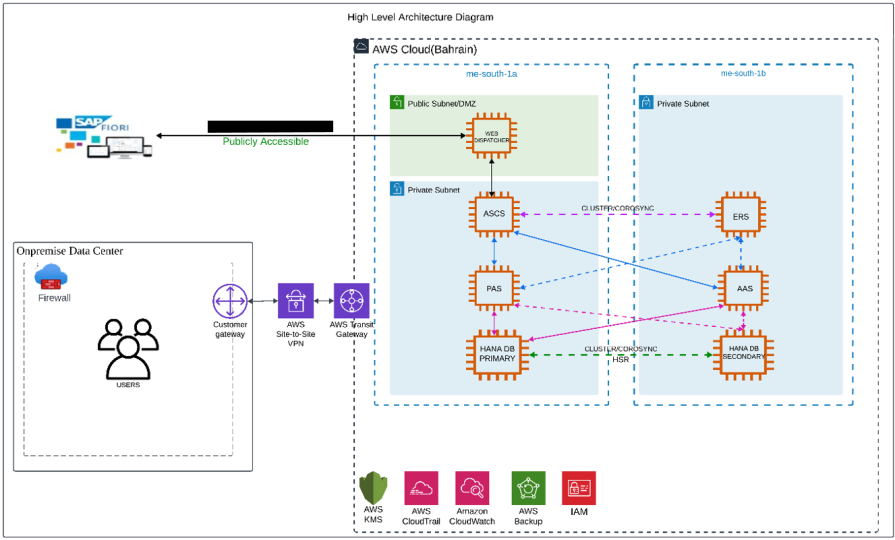
  • ASCS and ERS distributed across Availability Zones
  • AAS included for resilience and workload distribution
  • Dedicated HANA database tier spanning Availability Zones
  • Web Dispatcher used for secure Fiori access

Filesystems

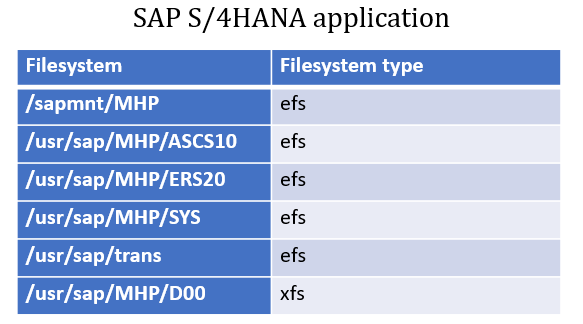
SAP S/4HANA application
Production application filesystem layout
SAP HANA database
Production database filesystem layout
SAP Web Dispatcher
Web Dispatcher filesystem layout

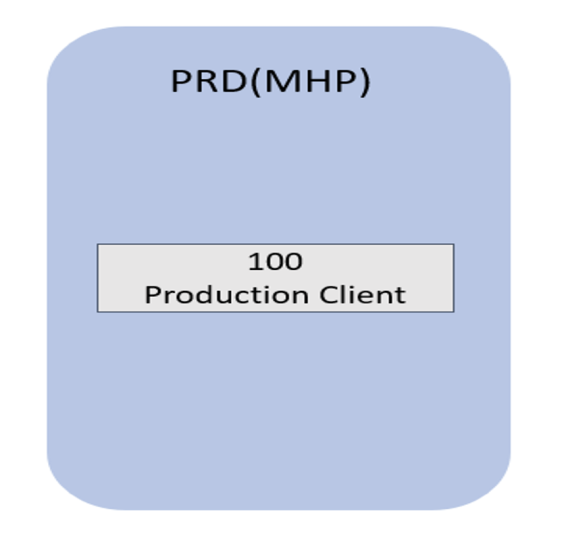
Clients in S/4HANA Production system

Client 100 – Production

The live customer client, used to record the customers business transactions.

Production client 100

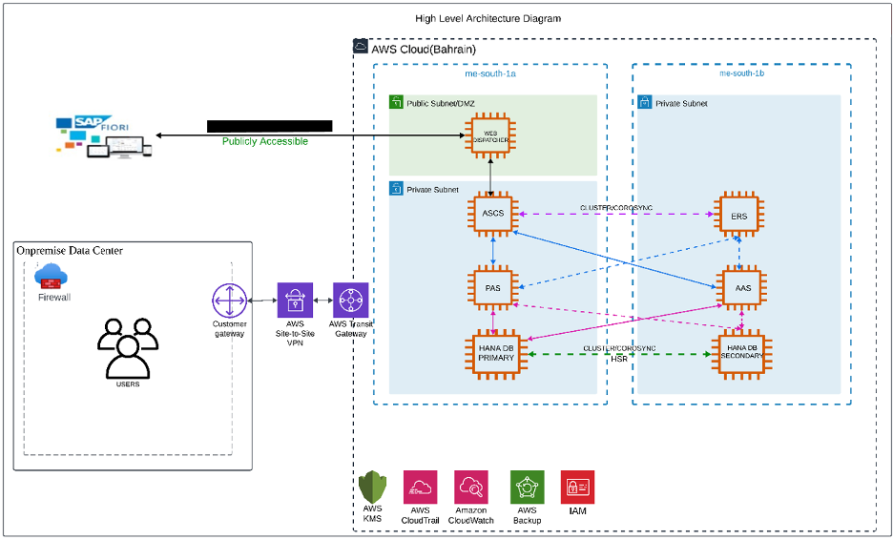
The architecture diagram depicts production environment where SAP S/4HANA and the HANA database are hosted in a private subnet. A Web Dispatcher is deployed in the public subnet (DMZ) to facilitate secure access to Fiori application from the internet. All communication between AWS and the customer data center is routed through a Site-to-Site VPN connection. High availability (HA) in an SAP S/4HANA production environment is essential to ensure uninterrupted business operations, minimal downtime, and continuous access to critical enterprise applications and data.
Before we start to discuss the business continuity, we need to discuss about one more important topic i.e SAP HANA database backup. This is one of the most important check that need to be in place before the starting the SAP HANA database high availability.

Application architecture diagram with public and private subnets

SAP HANA Database Backup Configuration

Before enabling SAP HANA system replication, ensure that backups are configured. In our case, we used AWS Backint to back up the HANA database to an S3 bucket and scheduled daily backups using SAP HANA Cockpit.

  • AWS Backint used to back up SAP HANA to Amazon S3
  • Daily backup scheduling managed in SAP HANA Cockpit
  • Support for full, incremental, differential and log backups
  • Backup readiness treated as a prerequisite for HA

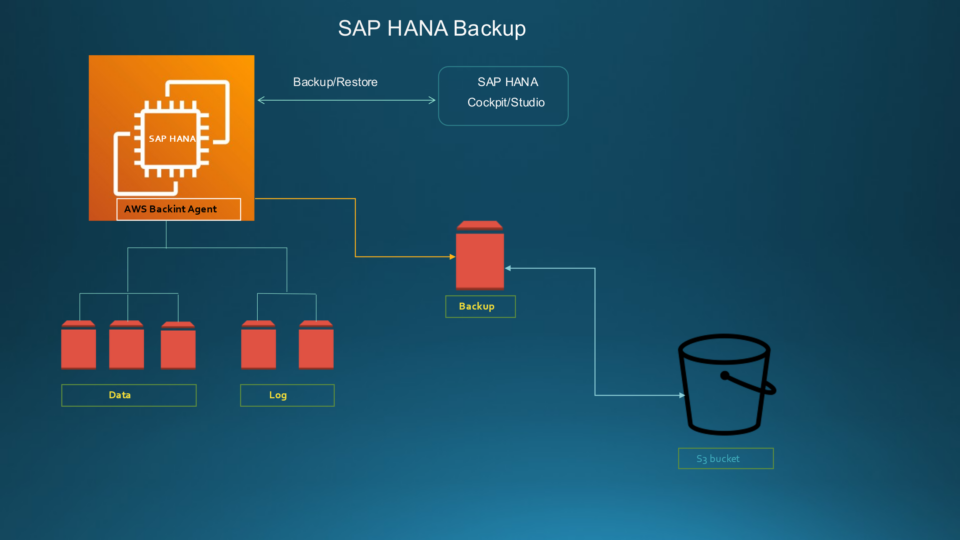
The above diagram specifies that the daily backup is triggered from SAP HANA Cockpit. The backup is configured using AWS backint. Amazon Backint Agent then stores the backup files in your Amazon S3 bucket based on the information provided in the Amazon Backint Agent for SAP HANA configuration file

Now let come to the most important topic that business continuity. As well all know that SAP is a mission critical application, it provides a unified platform for managing various business processes, streamlining operations, and improving overall efficiency. It’s a leading ERP (Enterprise Resource Planning) software that helps businesses of all sizes to integrate data and processes across different departments, enabling better decision-making and real-time insights.
Multi-AZ resilient deployment tailored for business-critical workloads. All services that could become single points of failure are replicated across multiple Availability Zones to provide fault tolerance and maximize uptime.
The below section explains how to configure SAP S/4HANA on AWS using SUSE Linux Enterprise Server (SLES). It provides step-by-step instructions for configuring a Pacemaker cluster for the ABAP SAP Central Services (ASCS) and the Enqueue Replication Server (ERS) across EC2 instances in two Availability Zones within the same AWS Region.

Backint backup flow from HANA Cockpit to object storage

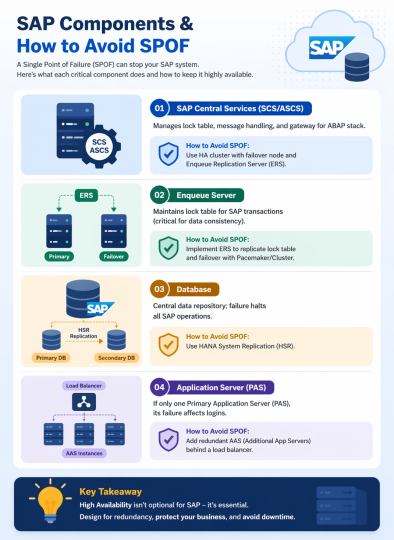
Common Single Points of Failure in SAP

Component Description How to Avoid SPOF
SAP Central Services (SCS/ASCS) Manages lock table, message handling, and gateway for ABAP stack Use HA cluster with failover node and Enqueue Replication Server (ERS)
Enqueue Server Maintains lock table for SAP transactions (critical for data consistency) Implement ERS to replicate lock table and failover with Pacemaker/Cluster
Database Central data repository; failure halts all SAP operations Use HANA System Replication (HSR)
Application Server (PAS) If only one Primary Application Server (PAS), its failure affects logins Add redundant AAS (Additional App Servers) behind a load balancer
Table of common single points of failure and mitigations

High-Availability (HA) Strategy

A pair of cluster nodes deployed in isolated subnets located in separate Availability Zones, all within a single VPC and AWS Region.
The PAS and AAS are distributed across different availability zones or physical servers, and configured behind a load balancer or SAP Web Dispatcher for load distribution and failover.

Enqueue Replication Server (ERS) is used to replicate lock table data from ASCS, ensuring failover without data loss in case of a primary node failure.
Permissions to view or modify the route tables associated with the specified subnets

  • SUSE Linux Enterprise Server for SAP applications (SLES for SAP).
  • AWS – Overlay IP

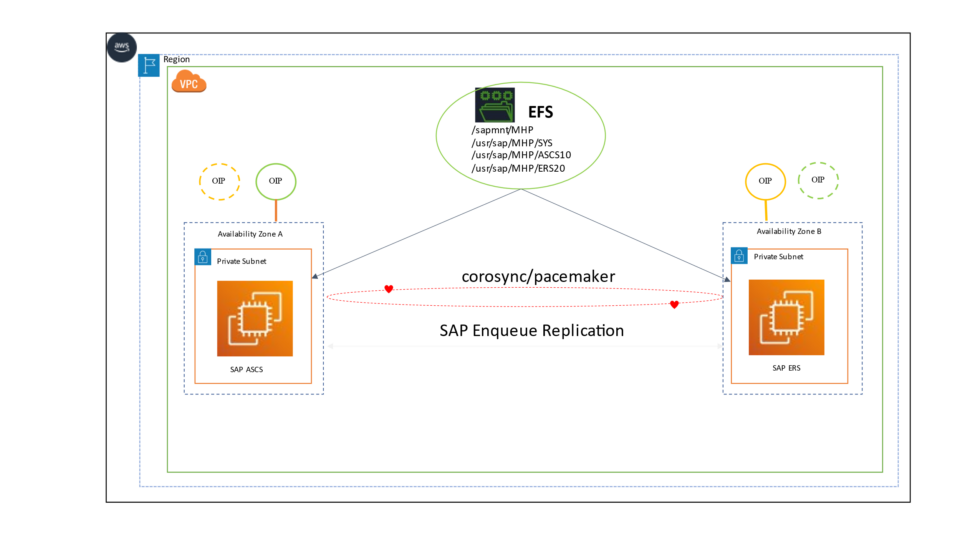
The above picture is a high-level diagram of how to mitigate the SOF at ASCS/ERS level. ASCS is a single point of failure. If it fails, SAP communication and locking stop.
SAP ASCS and ERS component are installed on 2 different nodes in 2 AZs. ERS is running on Node B, continuously replicating the lock table. If the ASCS fails, it moves to the another node automatically on which ERS is running, keeping the lock table consistent when ASCS starts.

SAP on AWS ASCS and ERS failover architecture across two nodes

Pacemaker Architecture

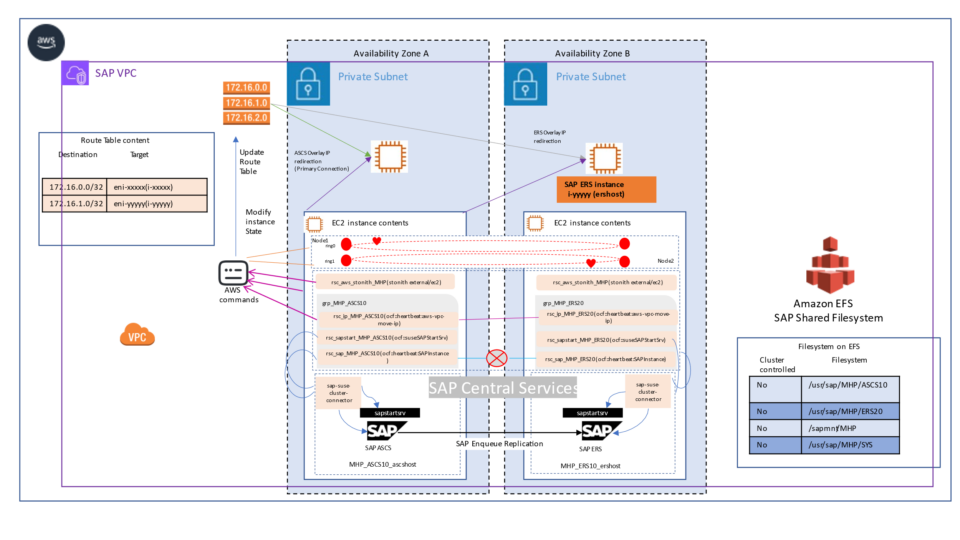
The above is low level architecture diagram showing the depth of the configuration, resource, corosync and pacemaker. Various cluster resources are configured to achieve the business continuity.

Pacemaker and Corosync resource architecture

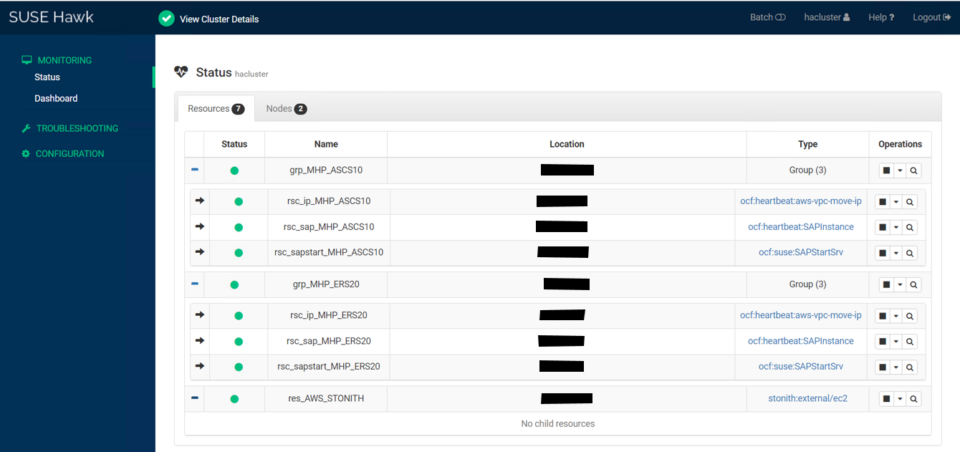
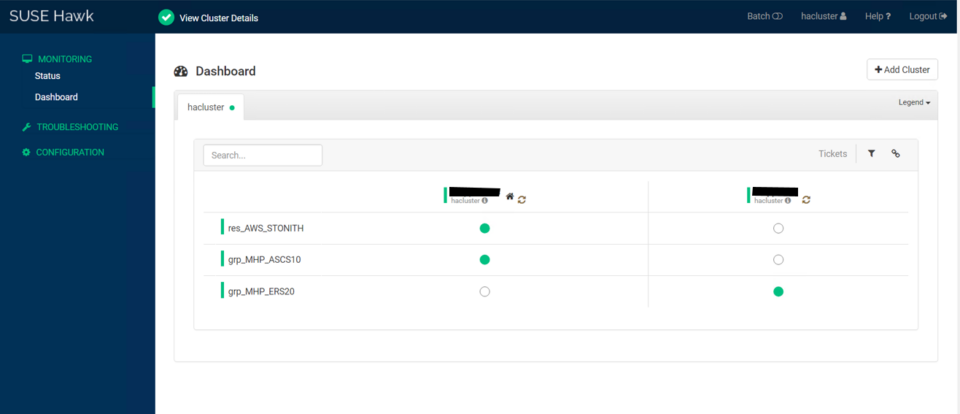
We created virtual IP, sapstartsrv and sap instance resources for ASCS and grouped them together. And in case of any failover, the group containing cluster resources will move to the node on which ERS is running together. In the same way we had also configured cluster resources for ERS and grouped them in different group.

Cluster resource grouping for central services
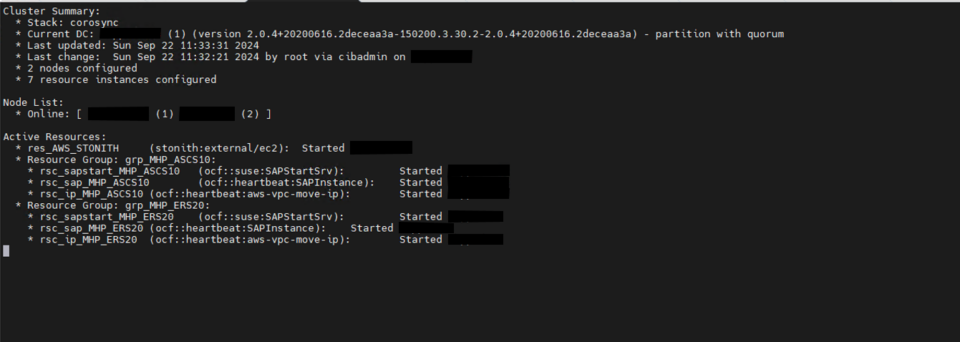
High availability cluster architecture with STONITH controls
Failover resource movement between cluster nodes

SAP HANA DB high Availability

In today’s fast-evolving digital landscape, the security, availability, and reliability of data are more critical than ever. Organizations increasingly rely on robust data management platforms like SAP HANA to ensure seamless operations, enable informed decision-making, and maintain a competitive edge. With its high-performance, in-memory architecture, SAP HANA plays a pivotal role in driving modern data strategies.
SAP HANA stands out as a powerful platform known for its exceptional speed and scalability. One of its key strengths lies in its system replication capabilities, which provide robust support for high availability, disaster recovery, and optimized data distribution—ensuring minimal disruption even during planned maintenance or unexpected failures.

SAP HANA System Replication is a critical feature designed to ensure high availability and business continuity. It enables real-time replication of data from a primary HANA system to one or more secondary systems, thereby minimizing downtime during planned maintenance or unexpected system failures.
The purpose of this blog is to provide insights into some of the essential terms and commonly used commands associated with HANA System Replication. Whether you’re setting it up for the first time or managing an existing configuration, understanding these elements is key to effectively maintaining a resilient SAP HANA environment.

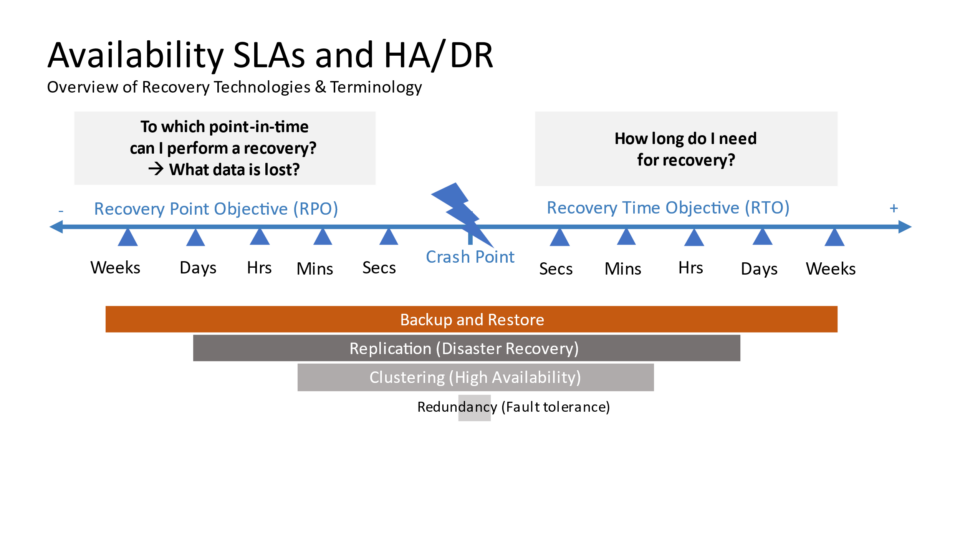
Every time we discuss Business Continuity, RTO and RPO naturally come into focus. Let’s break down what these terms really mean.
RTO (Recovery Time Objective) and RPO (Recovery Point Objective) are two key concepts in disaster recovery and business continuity planning, especially in IT and data systems

Achieving High Availability

Recovery Point Objective (RPO)

RPO defines the maximum allowable amount of data loss that an organization can tolerate in the event of a disruption or system failure.
In simpler terms: How much data can you afford to lose?

Recovery Time Objective (RTO)

RTO refers to the maximum acceptable downtime an organization can tolerate before restoring its systems and services following a disruption.
In simpler terms: How quickly must the system be back up and running?

Availability, recovery time and recovery point comparison

While RPO focuses on acceptable data loss, RTO addresses the acceptable recovery time. Effectively managing both requires a combined approach, including replication methods, backup strategies, system validation, and automated failover mechanisms—ensuring consistency, high availability, and rapid recovery in the face of disruptions.

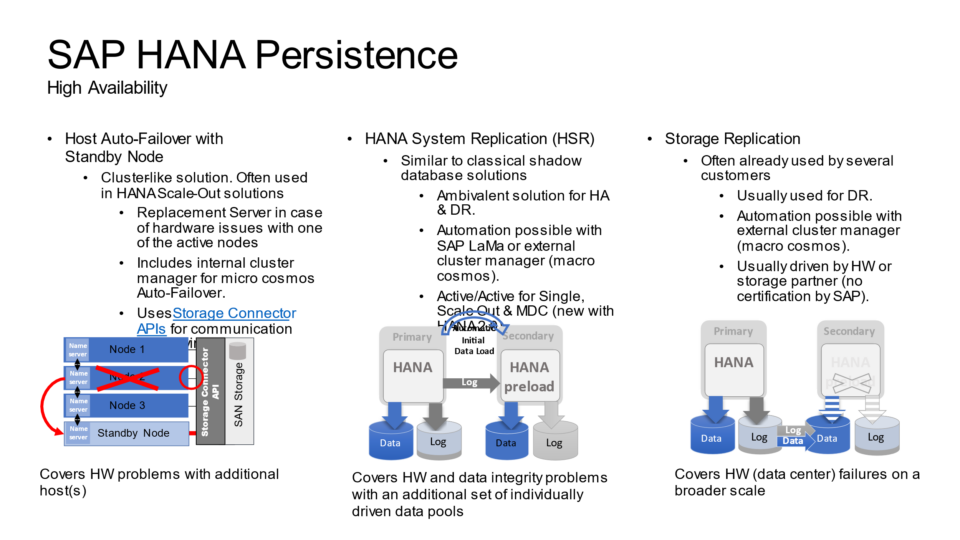
HANA replication mode comparison

Overview of SAP HANA Replication

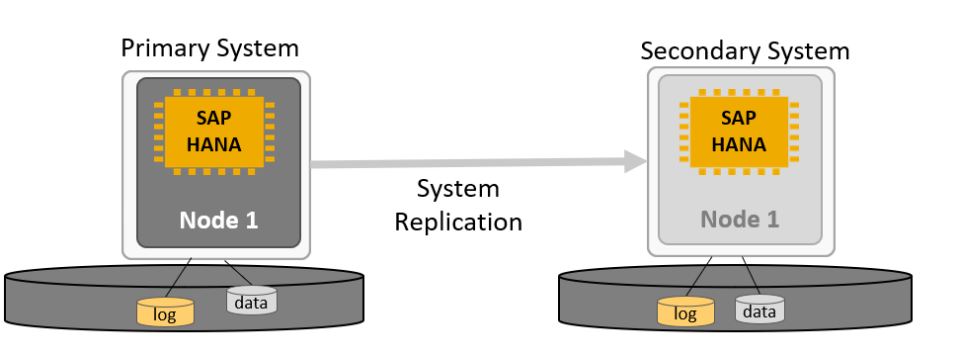
SAP HANA replication is a robust mechanism designed to duplicate data from a primary HANA system to one or more secondary systems. This real-time or near-real-time replication ensures that the secondary system mirrors the primary system’s memory and data, enabling rapid switchover when needed.

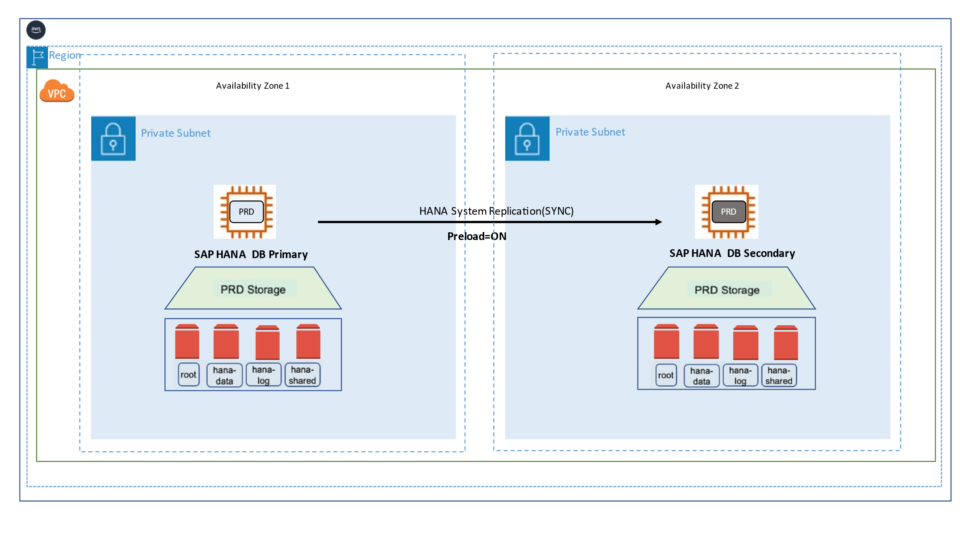
SAP HANA System Replication is a high availability feature offered by SAP to enhance the resilience of SAP HANA environments. It helps minimize downtime caused by planned maintenance, hardware failures, or disaster scenarios. In this setup, the secondary SAP HANA instance is a mirror of the primary system, maintaining an identical number of active hosts. Each service on the primary node continuously synchronizes with its corresponding service on the secondary node, operating in real-time replication mode to copy and persist both data and logs—typically preloading them into memory to enable rapid failover.

Ultimately, SAP HANA replication empowers organizations to remain resilient, highly available, and ready to meet the demands of today’s dynamic digital world.

System replication overview between primary and secondary database hosts

One of the most important aspect we also want to discuss in this paper is about the database backup. It is because backup is one of the criteria to be fulfilled before starting the hana system replication. Since we need to replicate logs from the primary node to the secondary node, it needs to be backed up before it is replicated. So, in order to store the logs, we have to configure the backup that can store the changes being persisted at the database.

HANA Cockpit backup configuration screen

SAP HANA System Replication on SLES for SAP Applications on AWS

SUSE’s approach automates the takeover process in SAP HANA system replication environments. While replicating data to a secondary SAP HANA instance ensures data availability, it doesn’t guarantee system continuity on its own. To enhance high availability, a cluster solution is required — one that manages the failover process and ensures seamless client access by handling the service address transition.

Cluster Solutions

SAP HANA deployments on AWS are architected to provide high availability and fault tolerance at the infrastructure level. However, failures at the SAP HANA database layer still require management. In the event of a hardware or software issue, a manual failover can be initiated using tools such as SAP HANA Cockpit, SAP HANA Studio, or the hdbnsutil command-line utility. These manual recovery procedures may lead to temporary disruptions in business operations.

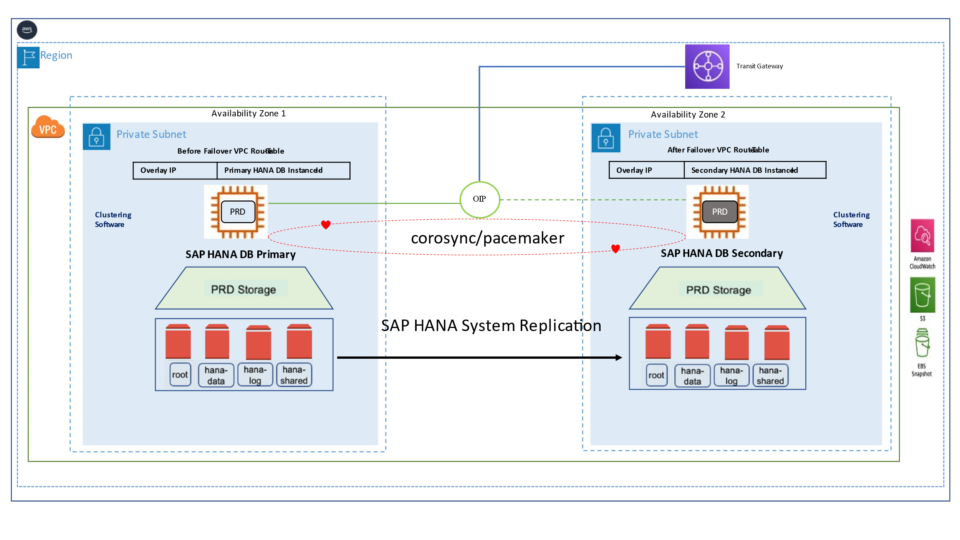
The high availability setup for SAP HANA leveraging System Replication enables automated failover between the primary and secondary instances. Both instances are configured within a Pacemaker cluster, which operates at the OS level and integrates with the SAP HANA database through specialized hooks. This clustering solution continuously monitors the system and initiates automatic failover when needed. As a result, recovery can typically be achieved within minutes or even faster.

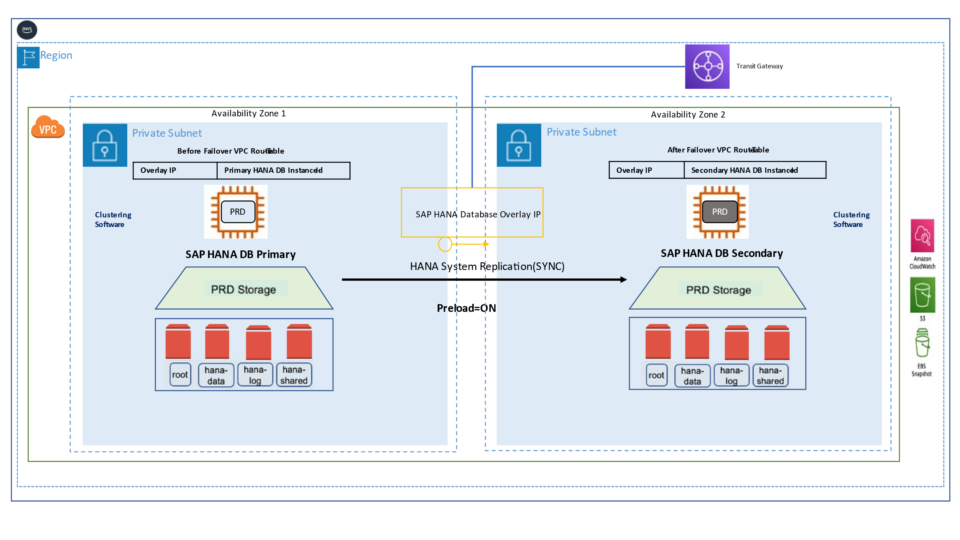
The Pacemaker cluster leverages a virtual IP address to route traffic to the active SAP HANA master instance. During a failover event, this virtual IP is reassigned to the standby instance, which is then promoted to become the new primary. On AWS, an overlay IP address is utilized for network configuration—this virtual IP consistently points to the active SAP HANA node, regardless of whether it resides on the original primary or the secondary system.

Architecture patterns

AWS organizes its infrastructure into distinct geographic locations known as regions and subdivides them further into Availability Zones (AZs). Deploying across multiple Availability Zones within a Region enhances fault tolerance and helps maintain consistent performance by reducing the impact of localized failures.

In a single-Region, multi-AZ setup, the secondary SAP HANA system can be deployed in a separate Availability Zone from the primary system within the same Region. This configuration supports fast failover during planned maintenance, storage issues, or localized disruptions, ensuring higher availability and operational continuity.

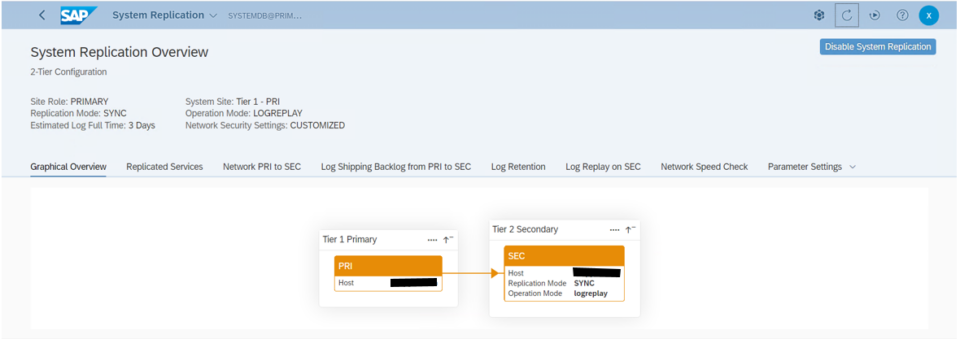
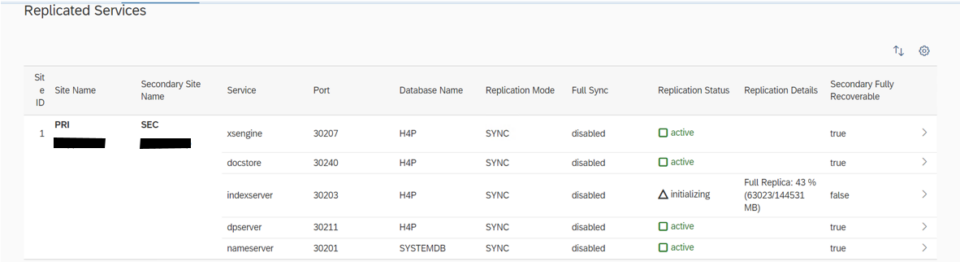
In our project, we have configured Active/Passive secondary system with Performance Optimized Scenario. System replication restricts read access and SQL querying on the secondary system until a takeover occurs, switching the active role from the primary to the secondary system. The secondary functions as a hot standby using the log replay operation mode. In the event of a failure of the primary SAP HANA system on primary node — whether due to a node or database instance issue—the cluster initiates a takeover process. This approach enables the secondary node to utilize pre-loaded data, making takeover significantly faster than a full local restart.

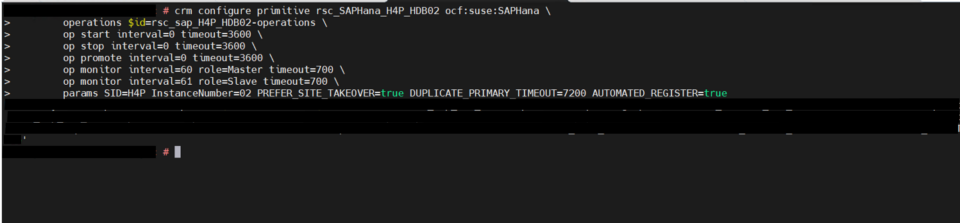
System replication for the production database is managed using the SAP HANA and SAP HANA Topology resource agents. The level of automation can be controlled using the AUTOMATED_REGISTER parameter. When enabled, the cluster automatically registers the former primary node as the new secondary after a failover.


SAP on AWS multi-AZ database replication topology
HSR configuration screen

Cluster Installation

When using SLES for SAP from the AWS Marketplace, SUSE HAE packages are already included. Check that you’re running the latest versions, and update via zypper as needed. Ensure that the following packages are installed.

corosync, crmsh, fence-agents, ha-cluster-bootstrap, pacemaker, patterns-ha-ha_sles, resource-agents, cluster-glue

Before proceeding with cluster configuration, the Pacemaker service should be in a stopped state. Confirm its status and stop it if active.

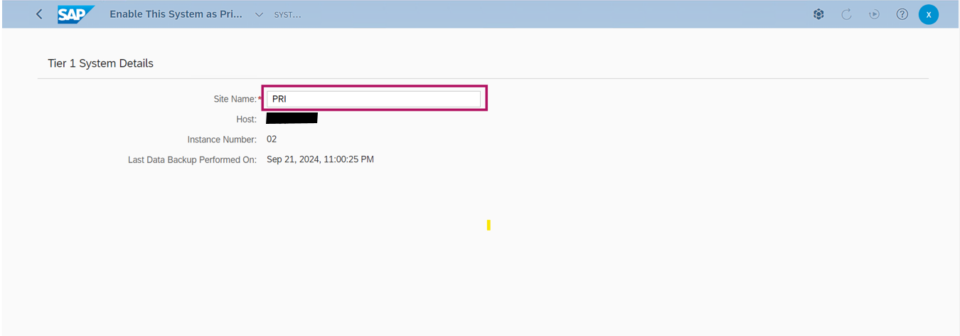
HSR Configuration

Enable Replication on the primary node
Primary node replication enablement command output
SAP on AWS replication configuration showing SIT system details
Register the secondary system
Secondary database registration command output
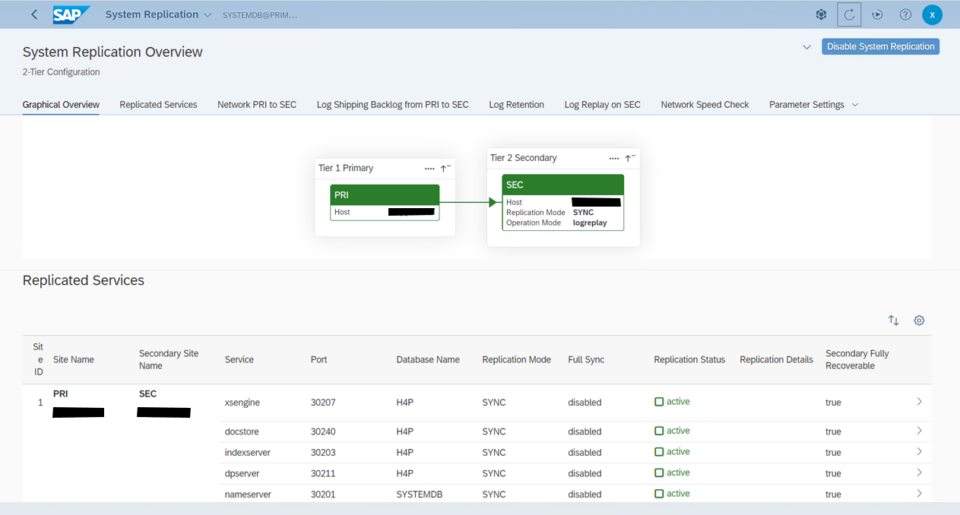
HANA Cockpit system replication status view
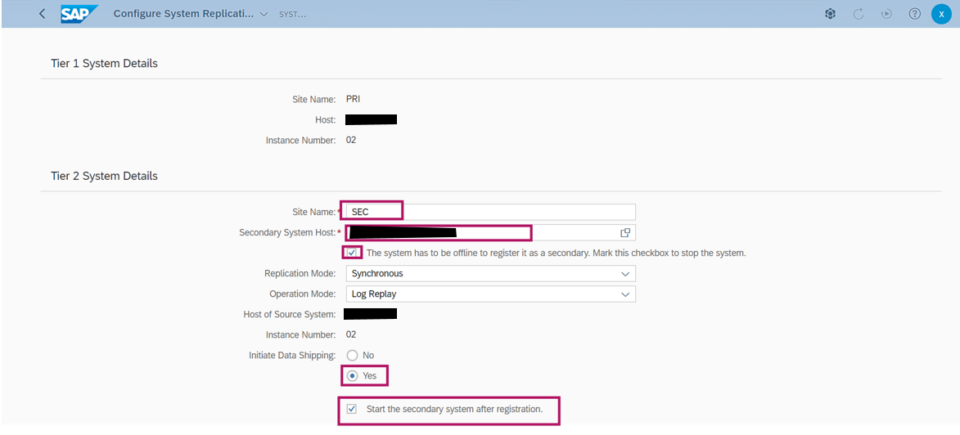
Replication mode and operation mode configuration
Database replication parameter screen

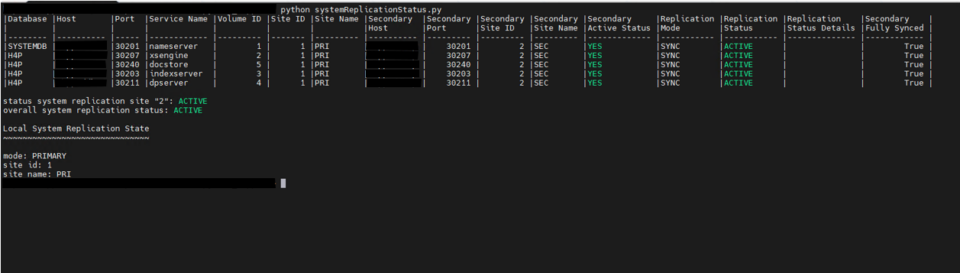
If we want to see the hana system replication from OS level, we should run the python script systemReplicationStatus.py using the sidadm user.
systemReplicationStatus.py command output

Pacemaker Cluster

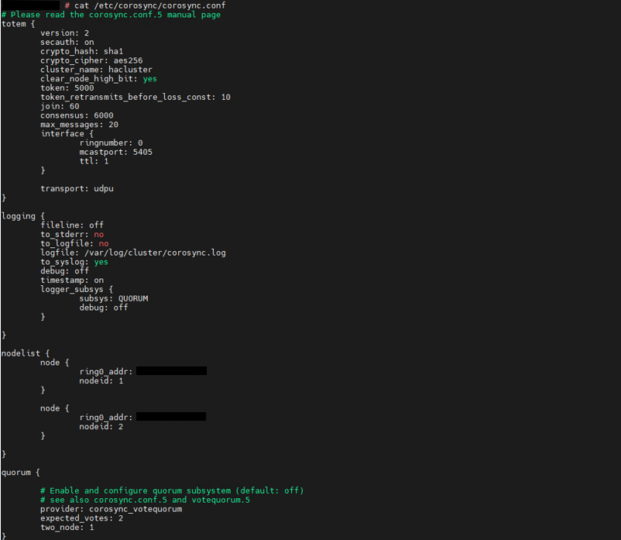
1. Corosync configuration

    The Pacemaker cluster service must be inactive during cluster configuration. Verify its status and stop the service if necessary.
    systemctl status pacemaker

2. Create encryption keys

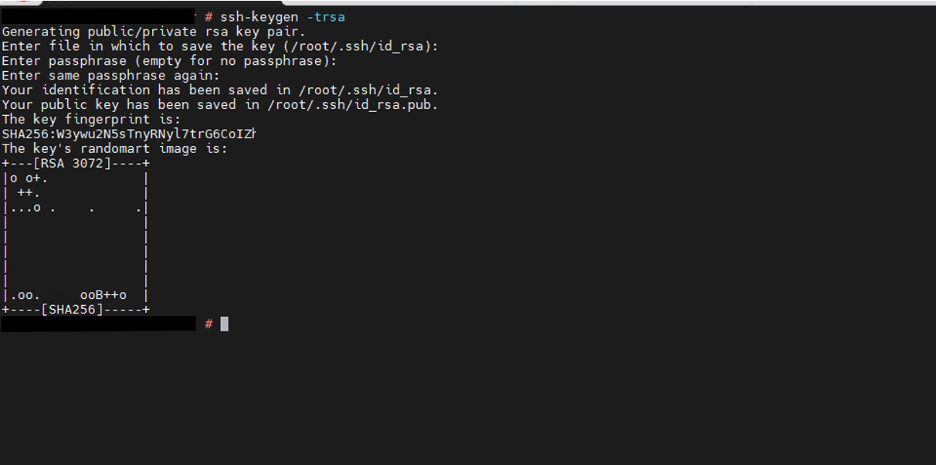
    After creation, the authkey file is located at /etc/corosync/. Copy it to the same location on the second node, making sure that file permissions and ownership remain unchanged.
SSH access to cluster nodes
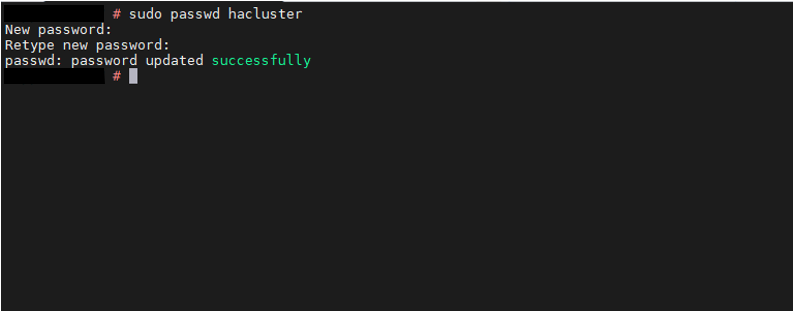
Update the hacluster password
hacluster password update command output
Pacemaker cluster command output
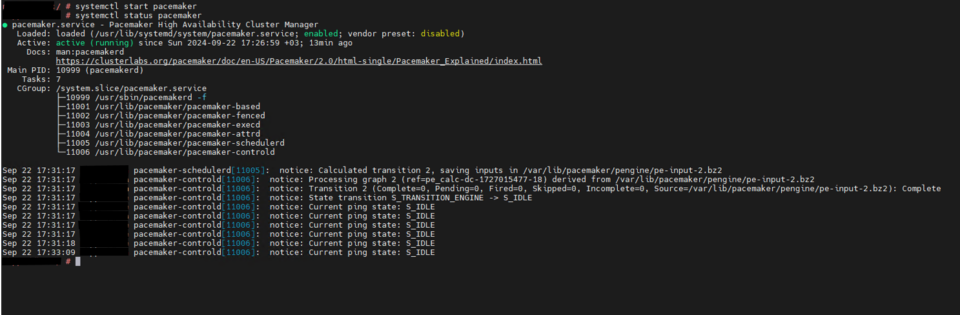
Start the cluster
Cluster startup command output

Cluster the bootstrap

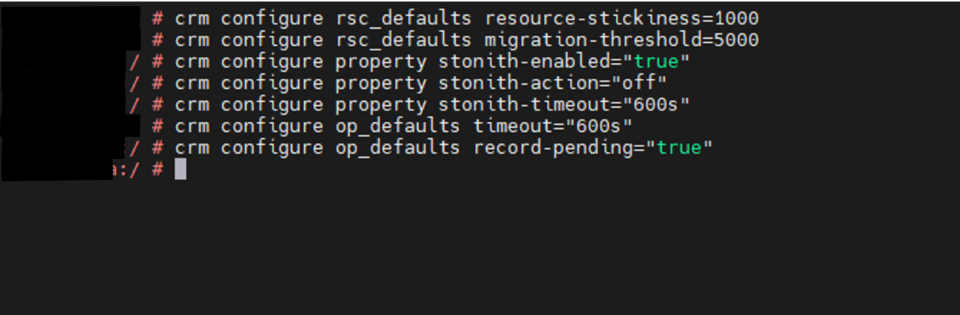
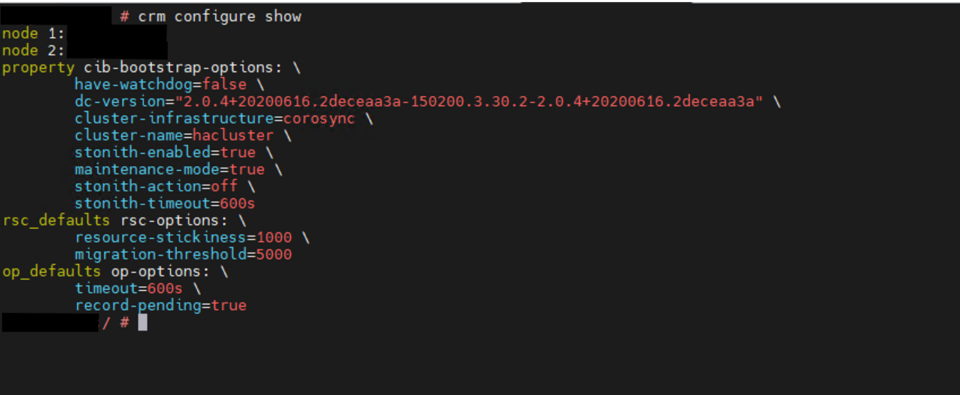
It’s typically run before adding the HANA resource to the cluster or during initial cluster setup. When the stonith-action parameter is set to “off”, the agents initiate a shutdown of the instance during failover scenarios.

Cluster bootstrap configuration output
Cluster defaults and resource settings
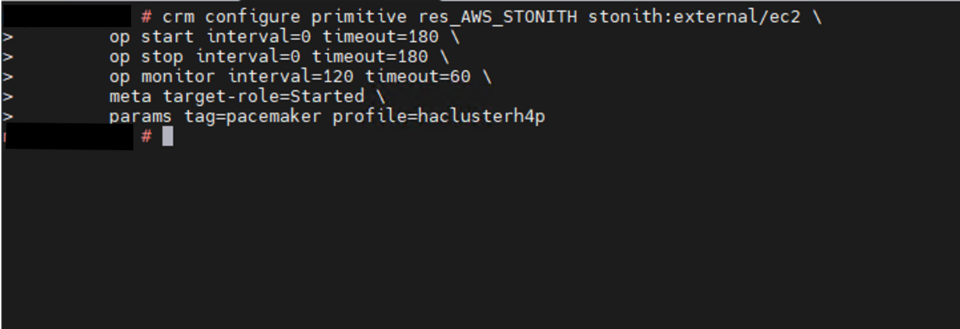
STONITH - Grant permissions for both nodes to start/stop
STONITH permission configuration for both nodes
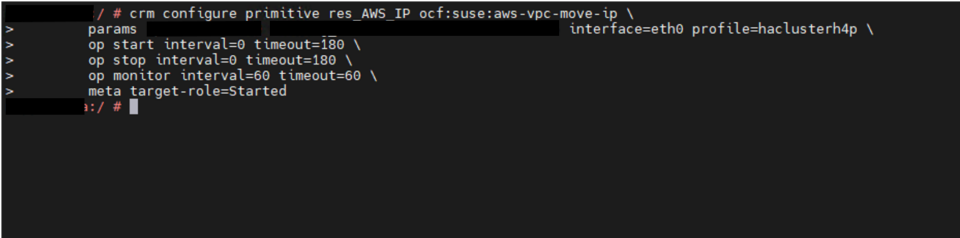
Overlay IP resource
Overlay IP resource command output
SAPHanaTopology
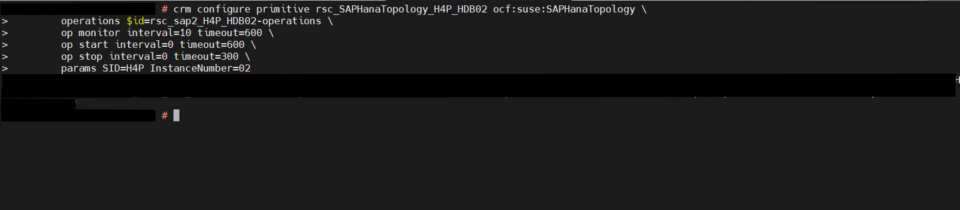
SAPHanaTopology resource configuration
SAPHana
SAPHana resource configuration
Constraints - Multi-state (MSL)
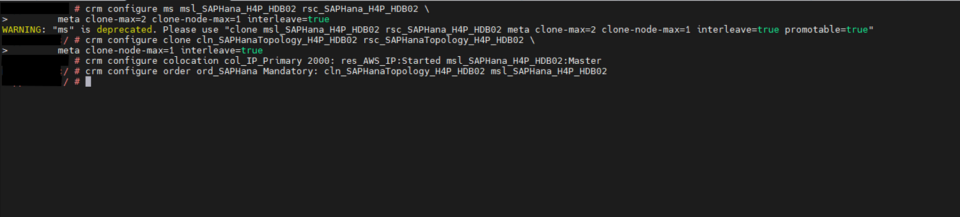
Multi-state resource constraint configuration
Cluster Status
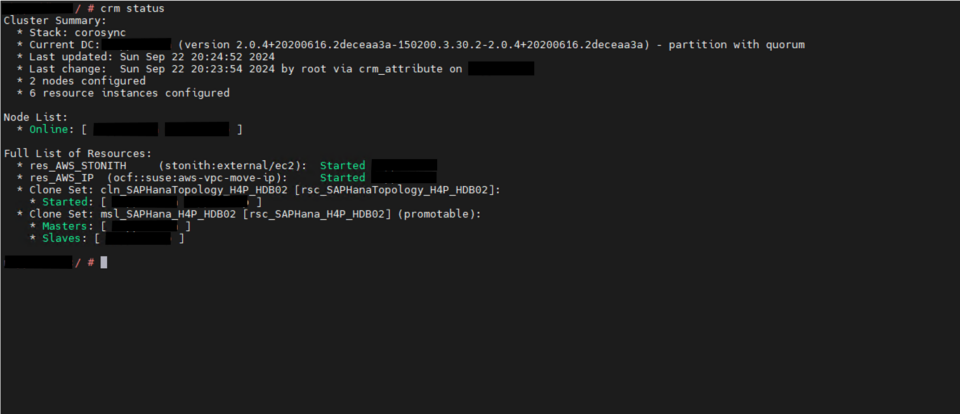
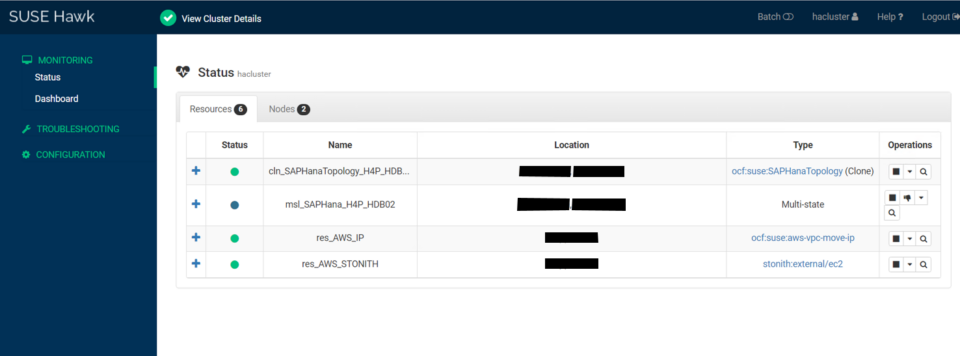
Cluster status showing synchronized replication
Bootstrap and fencing configuration output

Takeover Procedure During An Outage

Initial Situation

    o SAP NetWeaver is connecting to SAP HANA via the DBSL (Database Shared Library)
    o Usually a virtual hostname (virt. IP address) is used to access the database host and the database instance on that host. Usually the Domain Names Service (DNS) translates virtual hostnames into corresponding virt. IP addresses which can move between network adapter ports.
    o SAP HANA System Replication is working and secondary is in a synchronous or asynchronous state with primary SAP HANA instance.
    o System Replication always tries to get in synchronous state
    o With SYNC setup the primary waits for secondary to confirm operation of COMMITs

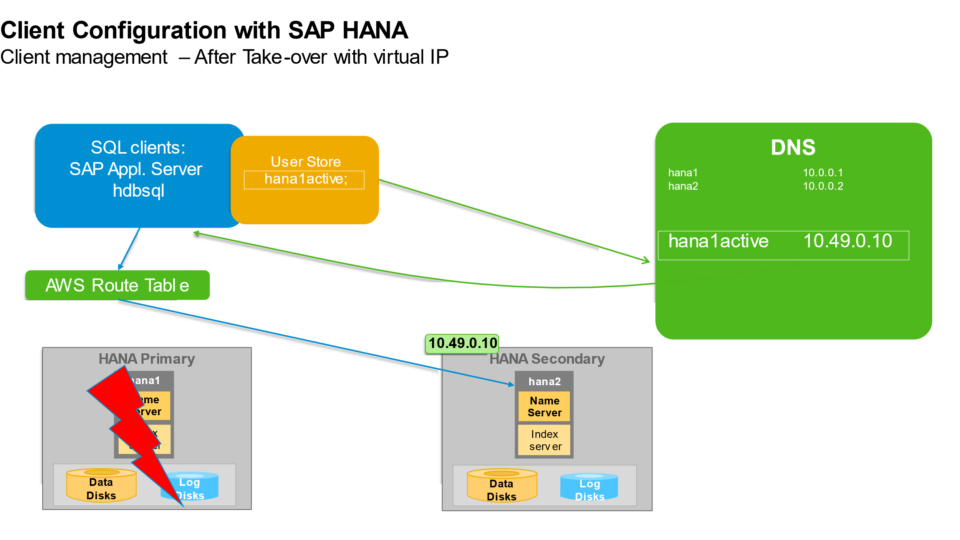
Incident happens, Take-over executed

    o A cluster manager is checking on operational state of the setup and takes action if a failure is happening
    o In case of this failure the cluster manager would isolate the box (drag virt. IPs away, even send a STONITH command) to prevent any further usage of primary host
    o The orchestrator “cluster manager” also initiates the take-over, waits for the secondary to prompt the full operational state and finally moves the virtual IP address to the secondary host network port.
    o With the move of the virtual IP address finally there is a living system again behind this interface and SAP NetWeaver sessions with work-processes can be reconnected to the secondary database instance

      Follow-up and re-initiate SAP HANA System Replication in reverse direction

    o Every committed transaction and related changes are available again on the take-over system.
    o The resynchronization between new secondary and primary instance will take automatically. The resync will probably take some time.
    o Here SAP HANA automatically choses the optimal way to fulfill this task of execution (delta-transfer).
    o Only after this resync a takeover back to the initial situation (failback) can be started.

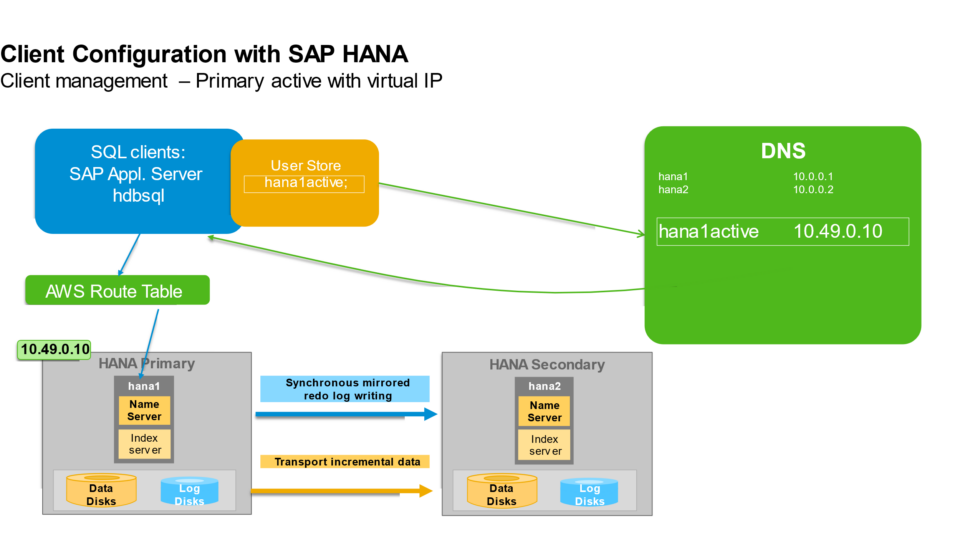
Client Connection

    Connecting clients to SAP HANA using a virtual IP (VIP) on AWS typically involves configuring High Availability (HA) solutions that utilize a floating IP address for failover scenarios. This ensures continuous access to the SAP HANA database even if the primary instance becomes unavailable.
    A virtual IP address (or overlay IP address) is configured within the HA cluster. This IP address is not permanently bound to a specific instance but floats between the active and passive nodes.
    Clients (e.g., SAP applications, SAP HANA Studio, custom applications) are configured to connect to the SAP HANA database using this virtual IP address.
    During a failover, the clustering solution automatically moves the virtual IP address to the new active SAP HANA instance. This ensures that clients can seamlessly reconnect to the database without manual reconfiguration, as the connection target (the VIP) remains constant.

Takeover procedure sequence for database outage
Failover takeover command output

A successful SAP on AWS go-live depends on more than the application build

A successful SAP S/4HANA implementation on AWS is not only about installing the application and migrating data. The wider landscape has to be ready for real business use: secure connectivity, clear transport control, monitoring, backup, recovery, high availability, and
a tested continuity model all need to be in place before go-live.

In this implementation, the greenfield S/4HANA build was supported by a structured AWS architecture across development, quality, and production. SAP Best Practices were activated, legacy ECC data was migrated using Migration Cockpit, and the production environment was
designed with business-critical availability in mind.

The most important lesson is that Basis, infrastructure, and continuity planning cannot sit behind the functional workstream. They have to move alongside it. When the platform foundations are designed early, tested properly, and aligned to the business operating model,
the go-live becomes a controlled transition rather than a technical risk event.

  • Treat the AWS foundation as part of the SAP implementation, not a separate infrastructure task.
  • Design development, quality, and production with clear differences in capacity, availability, and purpose.
  • Complete backup and recovery configuration before relying on high availability controls.
  • Use Solution Manager, monitoring, and transport governance to keep the programme controlled.
  • Build production around real business continuity requirements, not just technical deployment success.
  • Validate the go-live approach across application, database, network, and operational support layers.

Planning an SAP implementation on AWS?

Cloudwrxs can help with SAP Basis delivery, landscape design, backup and recovery, HA architecture and controlled go-live support on AWS.

Talk to Cloudwrxs